Last Updated: November 7, 2026
Quick Summary
Security coverage levels should be chosen by first completing a security risk assessment that inventories your assets, identifies vulnerabilities, and ranks likely threats. Match the tier to that ranked risk, from basic deterrence to intermediate monitoring to advanced layered protection, rather than defaulting to the highest level.
- Inventory assets and estimate their value before hiring any vendor or guard.
- Basic, intermediate, and advanced tiers differ in cost, responsiveness, and control.
- Multiply exposure hours by post count, then add a 15 to 25 percent relief factor.
- Ask a remote monitoring provider how quickly a responder arrives after an alarm.
- Track response time, incident frequency, and uncovered hours, and reassess after material changes.
Table of Contents
- Start With a Security Risk Assessment
- Matching Protection to Business Size, Operations and Site Characteristics
- Understanding Business Security Levels: Basic, Intermediate and Advanced
- Calculating Coverage Hours and Staffing Scenarios
- Personal Protection Levels for Executives and Individuals
- Security Plan Checklist: Building and Reviewing Your Coverage Plan
- Measuring Coverage Effectiveness and When to Reassess
- Requesting a Confidential Security Consultation
- Frequently Asked Questions
Start With a Security Risk Assessment
Choosing the right level of security coverage levels starts with knowing what you are protecting and from whom.
A security risk assessment is a documented review of your assets, your vulnerabilities, and the threats most likely to exploit them.
Work through the assessment in order; skipping a step usually means paying for coverage you do not need or missing the exposure that matters most.
- Inventory what you own, control, or are responsible for
- Assign a realistic value to each item, including reputational value
- Identify where each asset is weakest
- List the people or events most likely to cause harm
- Rank the results by likelihood and impact
A common mistake is asking which vendor to hire before the problem is defined, which locks in a solution too early.
Identifying Assets and Their Value
An asset is anything that would cause loss, disruption, or harm if it were stolen, damaged, exposed, or unavailable. For a business, that includes cash, inventory, intellectual property, customer data, executives, and the company's reputation.
List every asset, then estimate its value in U.S. dollars where possible.
Assets with the highest value and exposure deserve the most coverage; a low-value asset in a hard-to-reach location may need almost none.
Evaluating Vulnerabilities and Likely Threats
A vulnerability is a weakness that a threat could exploit (vulnerability - Glossary).
Threats are the people, events, or conditions that could exploit those weaknesses. Some are internal, such as a disgruntled employee or a vendor with excessive access; others are external, including theft, intrusion, surveillance, or a custody dispute that turns hostile.
Rate each vulnerability by how easily it could be exploited and how much damage would follow. A breach that has happened once is a far stronger signal than one you only imagine.
Matching Protection to Business Size, Operations and Site Characteristics
Protection needs grow with the complexity of your operations. A single-location office with twelve employees faces a different risk profile than a company with warehouses, remote staff, and overnight shifts. Size alone does not decide the answer. How the business runs and where it operates matter just as much.
Consider these factors when matching protection to your situation:
- Number of sites: Each location adds perimeter, access, and monitoring demands
- Operating hours: Overnight or weekend operations leave longer unattended windows
- Visitor volume: High foot traffic makes it harder to screen everyone
- Physical layout: Large lots, multiple entrances, and blind corners increase exposure
- Industry sensitivity: Firms holding client funds or privileged information face higher scrutiny
- Geographic setting: Crime patterns and access to emergency response vary by neighborhood
Walk each site yourself at the times it is most vulnerable. A parking lot that looks safe at noon may be a different place at 2 a.m. Document what you see; those notes become the basis for staffing and technology decisions.
Understanding Business Security Levels: Basic, Intermediate and Advanced
Most protection programs fall into three general tiers, each a different balance of cost, responsiveness, and control. Moving up a tier raises both capability and price, so match the tier to your assessed risk rather than choosing the highest by default.
- Basic: Deterrence and documentation, such as lighting, locks, and a camera system with recorded footage
- Intermediate: Active monitoring, access control, and scheduled patrols or on-call response
- Advanced: Dedicated personnel, layered technology, rapid response, and tailored investigation capability
A basic program may suit a low-risk office. An intermediate program often fits a business with cash handling or sensitive records. An advanced program is generally justified where a single incident could cause major financial or legal damage.
Physical Security, Access Control and Staffing Levels
Physical security is the first line of defense. It includes fencing, barriers, lighting, and locked doors. Access control determines who may enter each area and when, usually through key cards, codes, or visitor logs.
Staffing levels set how many people watch the site and how quickly they can respond. A camera records an incident, but a person can stop it. The right balance depends on how fast you need a response and how many simultaneous risks you face.
Technology and staff work best together: cameras and alarms extend what a guard can see, and a guard adds judgment a system lacks.
Guard, Remote-Monitoring and Hybrid Coverage Compared
Each coverage model suits a different risk profile:
| Model | Strengths | Limitations | Best For |
|---|---|---|---|
| On-site guard | Immediate presence, deterrence, judgment | Higher labor cost, limited to one location | High-traffic or high-value sites |
| Remote monitoring | Covers many sites, lower staffing cost | Response depends on distance and dispatch | Multi-site or after-hours alarm response |
| Hybrid | Combines presence with remote oversight | More complex to manage | Sites with mixed risk or changing hours |
Remote monitoring can be effective, but ask how quickly a responder arrives after an alarm. A camera feed watched from a distant office has limited value if no one can reach the site in time.
Calculating Coverage Hours and Staffing Scenarios
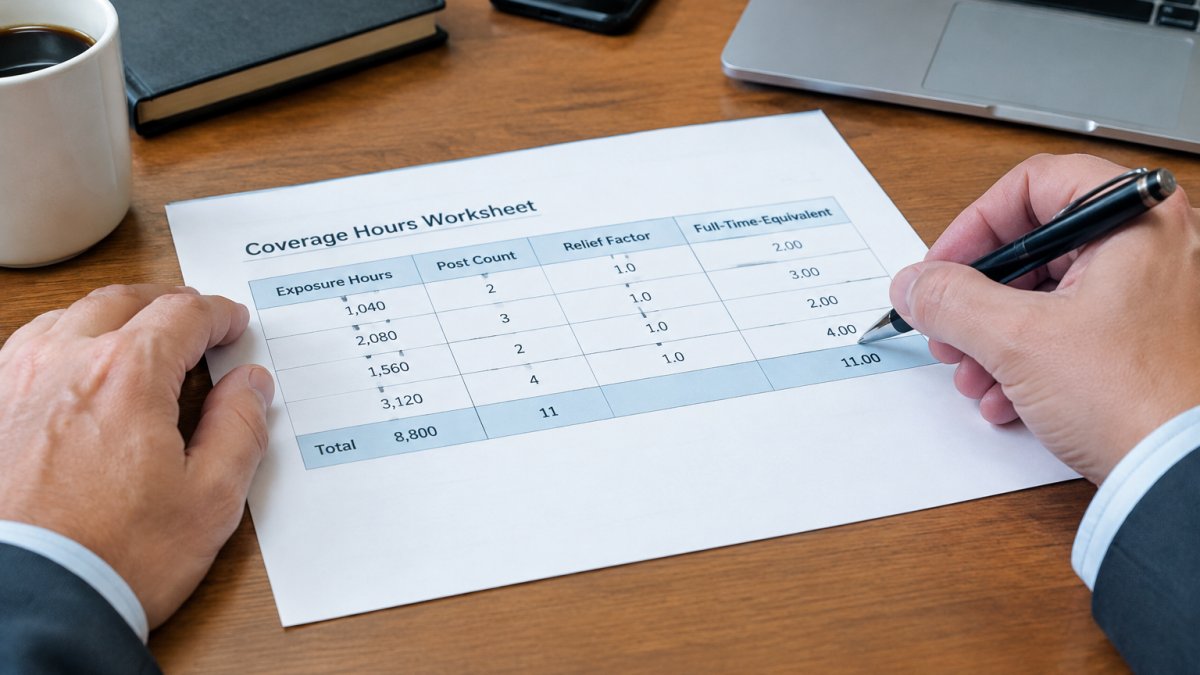
Coverage hours are the total time a site needs protection.
Start with three inputs before you price anything:
- Exposure hours: The hours the site is occupied, holds assets, or is otherwise vulnerable. A 9-to-5 office has roughly 40 exposure hours per week; a 24/7 warehouse has 168.
- Post count: The number of positions that must be staffed simultaneously. A single lobby entrance is one post; a lobby plus a loading dock plus a parking structure is three.
- Relief factor: The multiplier that accounts for breaks, call-offs, vacation, and training. A common planning pattern is to add 15 to 25 percent on top of raw post hours, with the higher end used where posts cannot be left unattended.
Multiply exposure hours by post count to get raw post hours, then apply the relief factor.
Test two or three scenarios before committing. Labeled examples make the trade-offs visible:
- Scenario A, Business-hours guard plus remote monitoring: One post for 50 hours per week (10 hours per weekday) with remote alarm monitoring overnight. Raw post hours are 50; with a 15 percent relief factor, about 58 paid hours, or roughly 1.5 full-time equivalents. Lower labor cost, but response after hours depends on the monitoring center's dispatch distance.
- Scenario B, One guard around the clock: One post for 168 hours per week. With a 20 percent relief factor, about 202 paid hours, or roughly 5 full-time equivalents. Highest labor cost, fastest on-site response, and the simplest to supervise.
- Scenario C, Mobile patrol plus cameras: No dedicated post; patrol visits of 30 to 60 minutes at scheduled intervals, with camera coverage between visits. Cost scales with visit frequency rather than continuous hours, but uncovered windows exist between patrols and must be documented.
Compare expected cost, response time, and uncovered hours for each scenario.
Watch out: a quote built on raw post hours without a relief factor will look cheaper than it is and will fail the first time an officer calls in sick.
Personal Protection Levels for Executives and Individuals
Personal protection follows the same logic as business security, but the stakes are personal. The question is who may be targeted, how visible that person is, and how their routine could be exploited.
Levels of personal protection generally include:
- Low-profile awareness: Route variation, information discipline, and basic travel planning
- Planned protection: Advance work on venues, a trained escort for higher-risk events, and coordinated transportation
- Continuous protection: Dedicated protective agents for individuals facing ongoing threats
Effective personal protection generally blends into daily life rather than drawing attention through a visible detail.
Electronic security countermeasures are also worth considering for executives who handle sensitive conversations. Technical sweeps can identify unauthorized listening devices, though no inspection can guarantee that a space is completely clean.
Security Plan Checklist: Building and Reviewing Your Coverage Plan
Use this checklist to document your plan and to test it each year:
- Assets listed with estimated values
- Vulnerabilities identified for each site or person
- Threats ranked by likelihood and impact
- Coverage tier selected for each risk
- Staffing hours calculated for each scenario
- Response time requirements written down
- Physical security and access control measures documented
- Insurance requirements reviewed, including policy exclusions
- Incident reporting and escalation steps defined
- Budget approved and reviewed annually
Keep the plan in writing; it helps your insurer, your legal counsel, and any future team understand why each decision was made.
Measuring Coverage Effectiveness and When to Reassess
A security program should be measured, not assumed to work. Pick a small set of indicators you can define, calculate, and compare over time, and track them consistently.
- Response time: The elapsed time from alarm or report to a responder arriving on site. Calculate the median and the worst case, not just the average, because a single slow night shift can expose more risk than a good average hides.
- Incident frequency: The number of reported incidents per 1,000 exposure hours. Normalizing by exposure hours lets you compare a busy site against a quiet one and compare this quarter against last.
- Patrol completion rate: The percentage of scheduled patrols actually completed and logged. A rate below the target you set (many programs aim for 95 percent or better) signals staffing or supervision problems before an incident occurs.
- Uncovered hours: The hours a site was exposed without the coverage the plan requires, whether from call-offs, late arrivals, or gaps between patrols. Track these explicitly; they are the clearest measure of whether the chosen level is actually being delivered.
- Access violations: Failed entry attempts, tailgating incidents, and badge exceptions. A rising count often precedes a physical security failure.
Review these numbers on a fixed cadence, quarterly for most organizations and monthly where risk is high. Compare against the targets written into your plan, not against a general impression.
A phased approach works better than a single overhaul.
Requesting a Confidential Security Consultation
Choosing security coverage levels involves sensitive details about your assets, people, and vulnerabilities. Special Solutions, Ltd. handles every consultation with strict confidentiality, and our licensed Illinois team can help you assess your risks, compare coverage options, and build a plan you can defend.
Start a confidential consultation to discuss your situation and receive a written recommendation tailored to your needs.
Frequently Asked Questions
What is security level 1, 2, 3?
Security levels are informal tiers used to describe how much protection a site receives. Level 1 usually means basic measures such as locks, alarms and lighting. Level 2 adds access control, cameras and scheduled patrols. Level 3 typically includes staffed coverage, monitored systems and documented response procedures. The exact tiers vary between providers, so ask any firm to define its levels in writing and map each one to specific staffing hours, equipment and response times before you sign a contract.
How much security coverage does a business need?
The right amount depends on the value of your assets, your operating hours, your site size and the threats you have identified in your security risk assessment. A small office with weekday-only hours may need little more than monitored alarms and access control. A facility with high-value inventory or round-the-clock operations usually needs staffed coverage during peak risk windows. Pricing depends on hours, locations and services, so request a written quote tailored to your site.
When should I increase my security coverage level?
Consider raising your coverage level after a break-in or attempted intrusion, when you add high-value assets or expand your site, when operating hours change, or when an insurance carrier or regulator requires stronger controls. Review coverage at least annually even without incidents. Track response times and incident logs, since patterns in these records often show that current staffing or monitoring no longer matches the actual risk.